Cabin crew simulation for MSFS

Your cabin goes to work.

Others make your cabin sound alive. CabinCRU makes it run: boarding, phase tracking, announcements and in-flight service — from gate to on-block, driven by real sim telemetry.

That's the installer. Rather unpack it yourself, wherever you want? Portable ZIP All versions

Free, no account needed. The app checks for updates on GitHub — see our privacy notice.

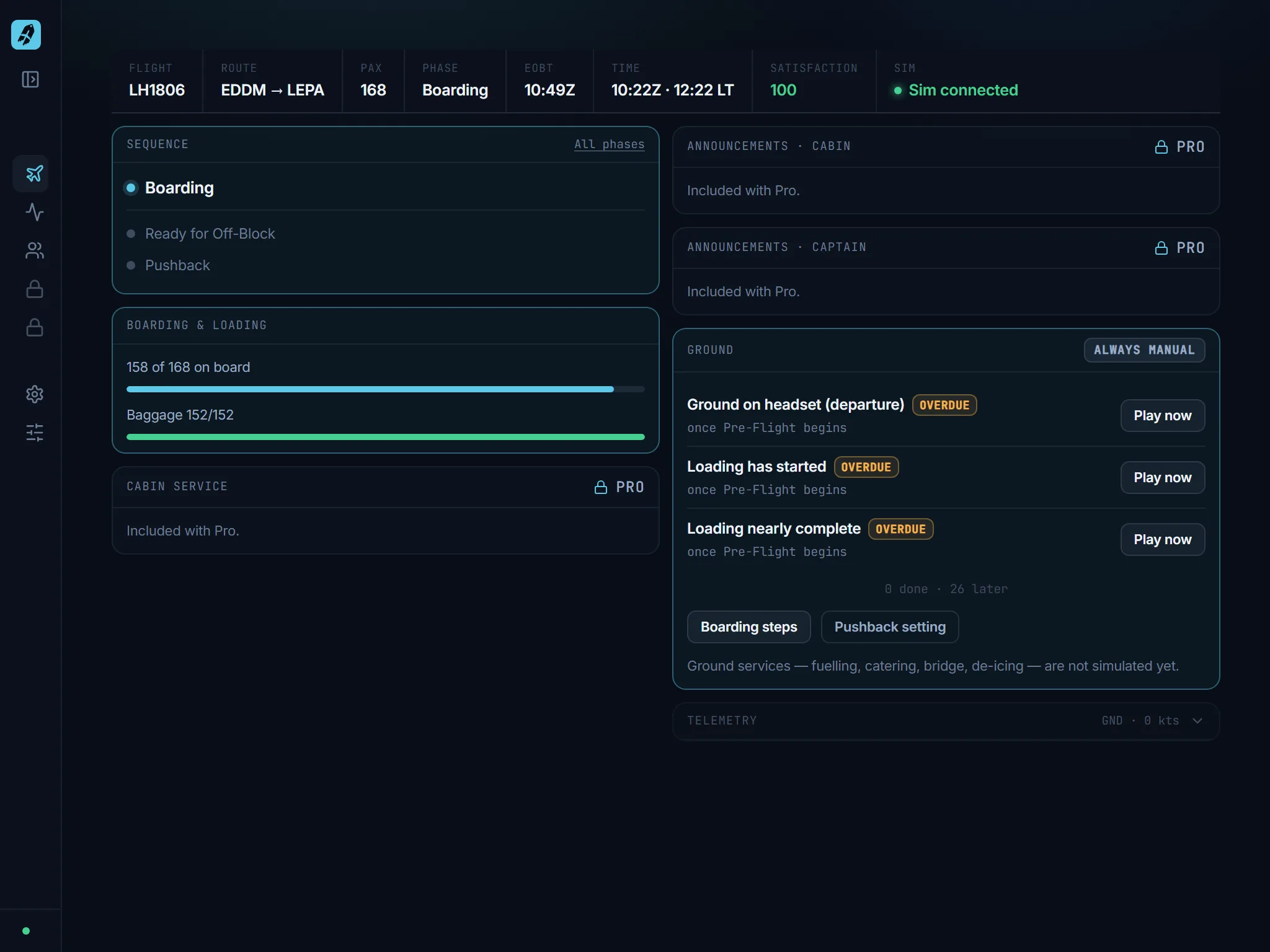
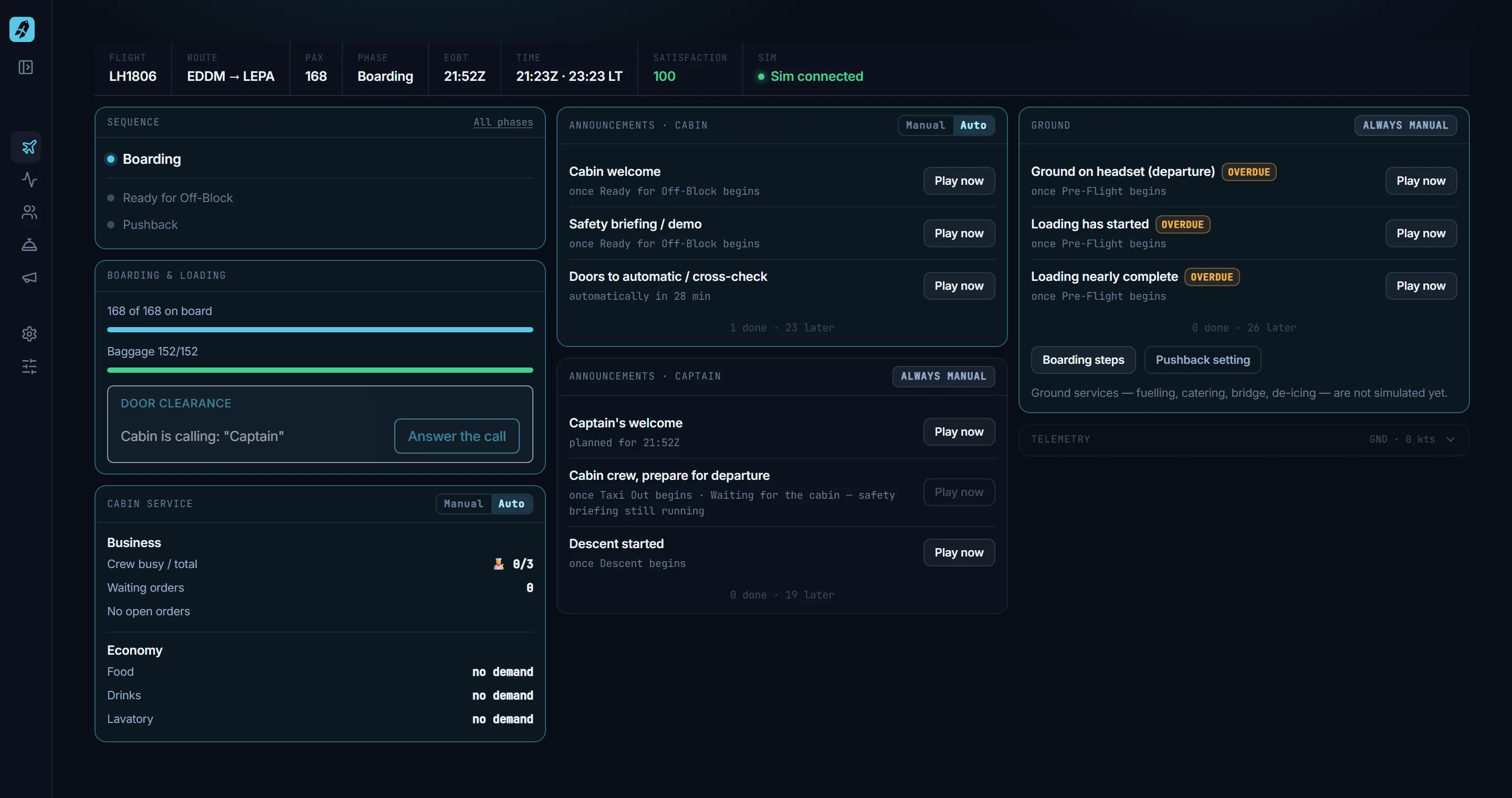
CabinCRU Flight Deck at the end of boarding: status band with flight LH1806, route EDDM to LEPA, 168 passengers, phase Boarding and satisfaction 100; tiles for sequence, boarding with door clearance call, cabin service, announcements, ground and telemetry.

The Flight Deck as boarding completes: the cabin is calling the captain for door clearance. Every screenshot on this page is taken from the app — the numbers are what you would see on a flight.

  • Windows app, talks to MSFS via SimConnect
  • Runs offline — no account needed for Free
  • Web app on your sim PC — open it on a tablet or second screen in your network
  • English and German UI; French, Spanish, Italian, Dutch, Polish and Portuguese machine-translated
  • Updates itself when a new version is out

How a flight runs with CabinCRU

Seven screens, one flight. Free covers everything you need to run the flight; Pro adds the cabin that talks back.

Free

One screen for the whole flight

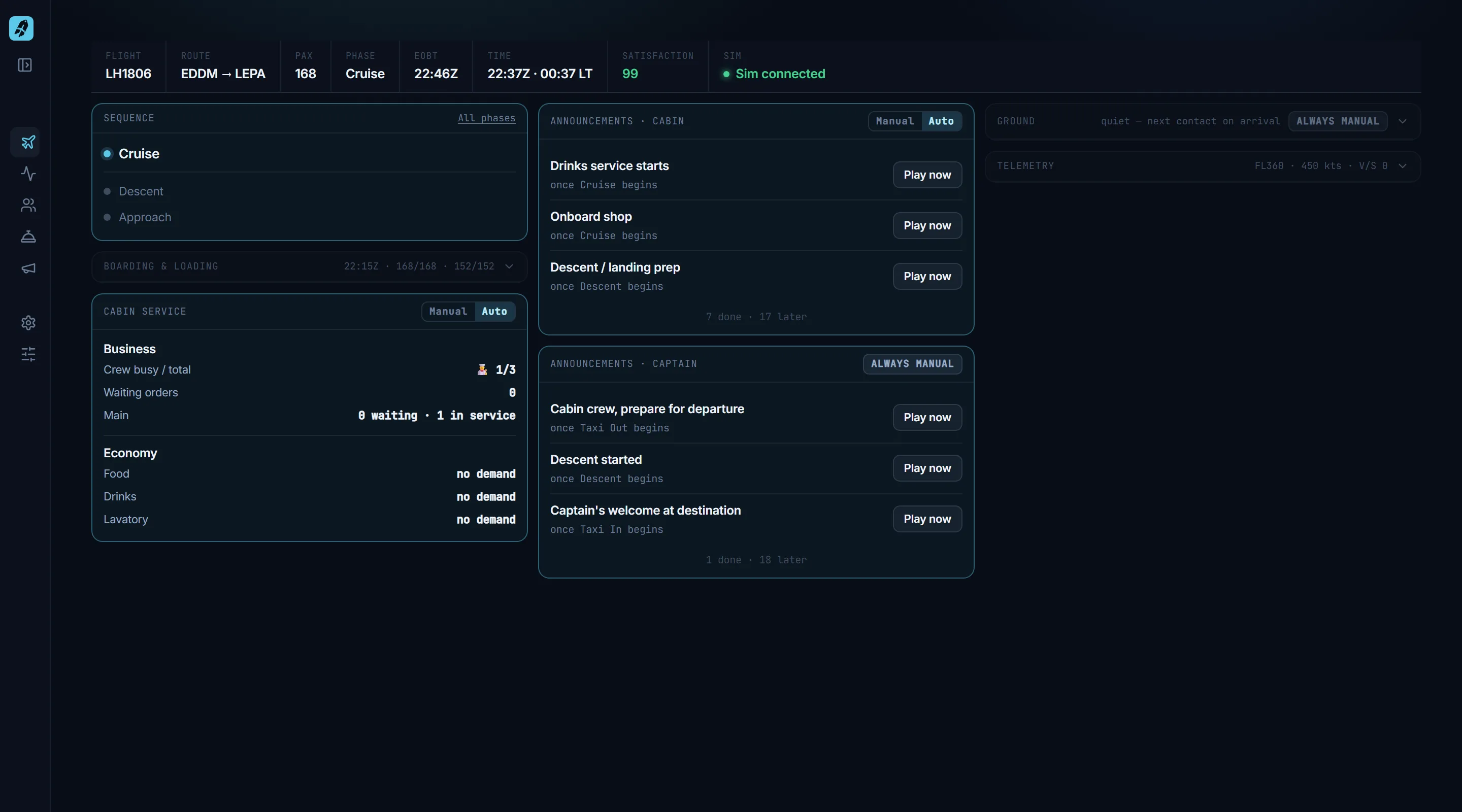
The Flight Deck keeps flight, route, phase, EOBT, time and passenger satisfaction in one status band, with tiles for the phase sequence, boarding, cabin service, announcements, ground calls and telemetry. What needs you lights up; what is done or quiet steps back.

  • ✦Telemetry straight from MSFS via SimConnect
  • ✦Auto or manual per tile — the crew runs it, or you do
  • ✦Cabin service and announcement tiles are Pro
More about this →

CabinCRU Flight Deck in cruise: sequence tile with Cruise, Descent and Approach, collapsed boarding tile, cabin service tile with Business and Economy, announcement tiles, ground and telemetry collapsed to one line.
Free

Control it from your tablet

CabinCRU is a web app served by a small local server on your sim PC. The desktop window is one client — the browser on your tablet, phone or second screen is another. Open the address of your sim PC on port 54800 (for example http://192.168.1.20:54800) from any device in your home network and you get the full app: start boarding, answer the cabin, run the service, play announcements — while MSFS keeps the main screen.

  • ✦Same app, same state on every device — no second install, no account
  • ✦Layout folds to two columns or one on smaller screens
  • ✦Windows asks once to allow CabinCRU through the firewall for your private network
CabinCRU Flight Deck at tablet width (1024 pixels): two columns with status band, sequence and boarding tiles on the left, announcement and ground tiles on the right, Pro tiles showing “Included with Pro”.
Free

Boarding that runs on the clock

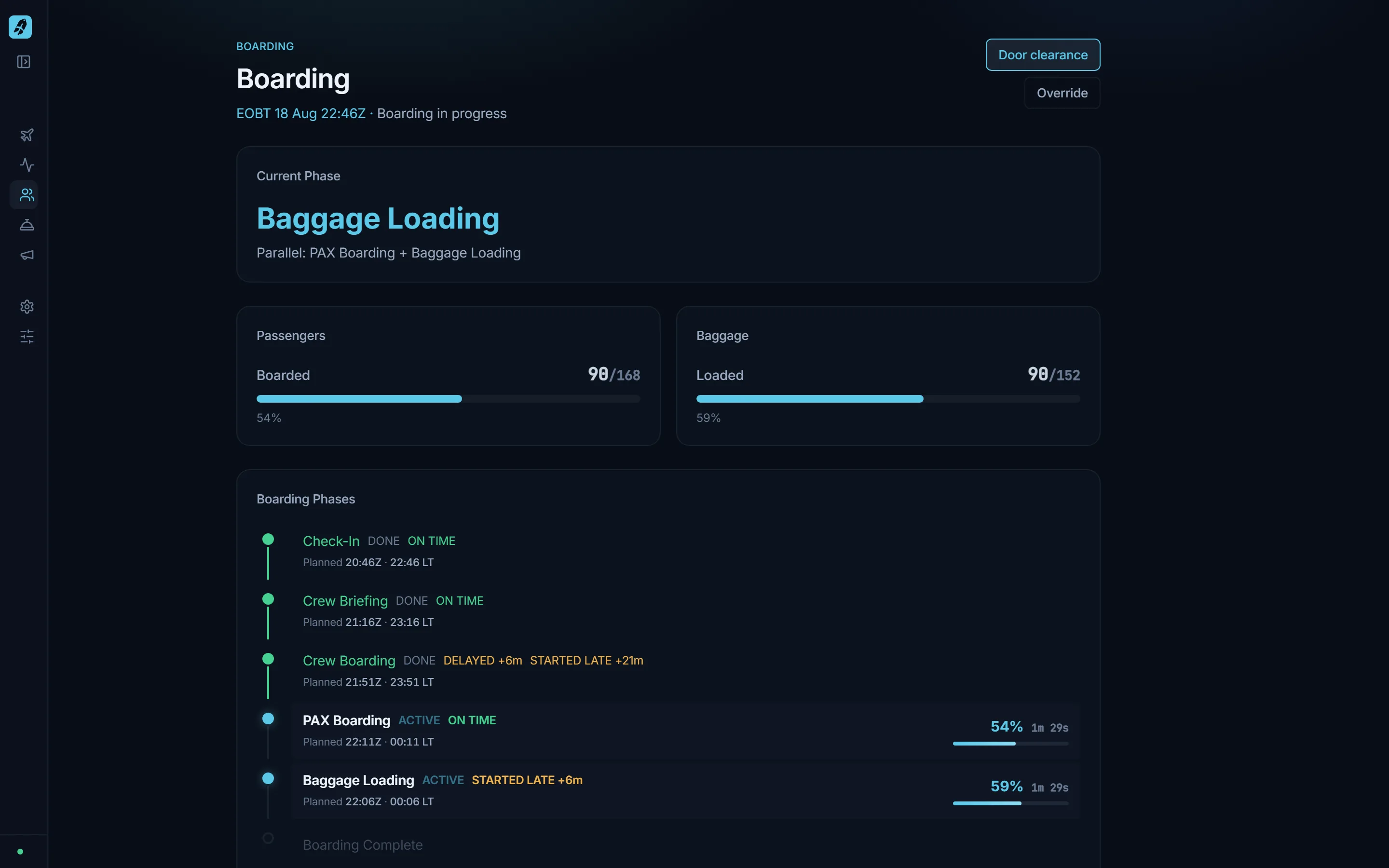
Check-in, crew briefing, crew boarding, passenger boarding and baggage loading are planned against your EOBT. You start the manual steps; CabinCRU tracks progress per step and marks what starts or runs late. When the last passenger is seated, the cabin calls you for door clearance.

  • ✦Boarding windows sized by aircraft category, timing by real passenger and bag counts
  • ✦Late starts and overruns show as minutes late — that is your delay tracking
  • ✦Door clearance as a captain interaction: answer the call, clear the doors

More about this →

CabinCRU Boarding page: 87 of 168 boarded, 87 of 152 bags loaded, boarding phases with planned times, DONE, ACTIVE and STARTED LATE badges.
Free

16 phases, detected from the sim

From Pre-Flight to Post-Flight, CabinCRU follows the aircraft: pushback, engine start, taxi, takeoff, climb, cruise, descent, approach, landing, taxi-in and shutdown are recognised from telemetry — parking brake, tug, engines, speed, altitude. If the sim does something odd, you can override.

  • ✦Pushback required or not — your call per flight
  • ✦Cruise level and top-of-descent taken from the plan
  • ✦Started, finished and duration recorded per phase

Animation of the CabinCRU sequence tile over a whole flight: the current phase and the next two, stepping from Pre-Flight through Boarding, Pushback, Taxi, Takeoff, Climb, Cruise, Descent, Approach, Landing, Taxi In and Shutdown to Post-Flight.
Pro

A cabin that gets hungry

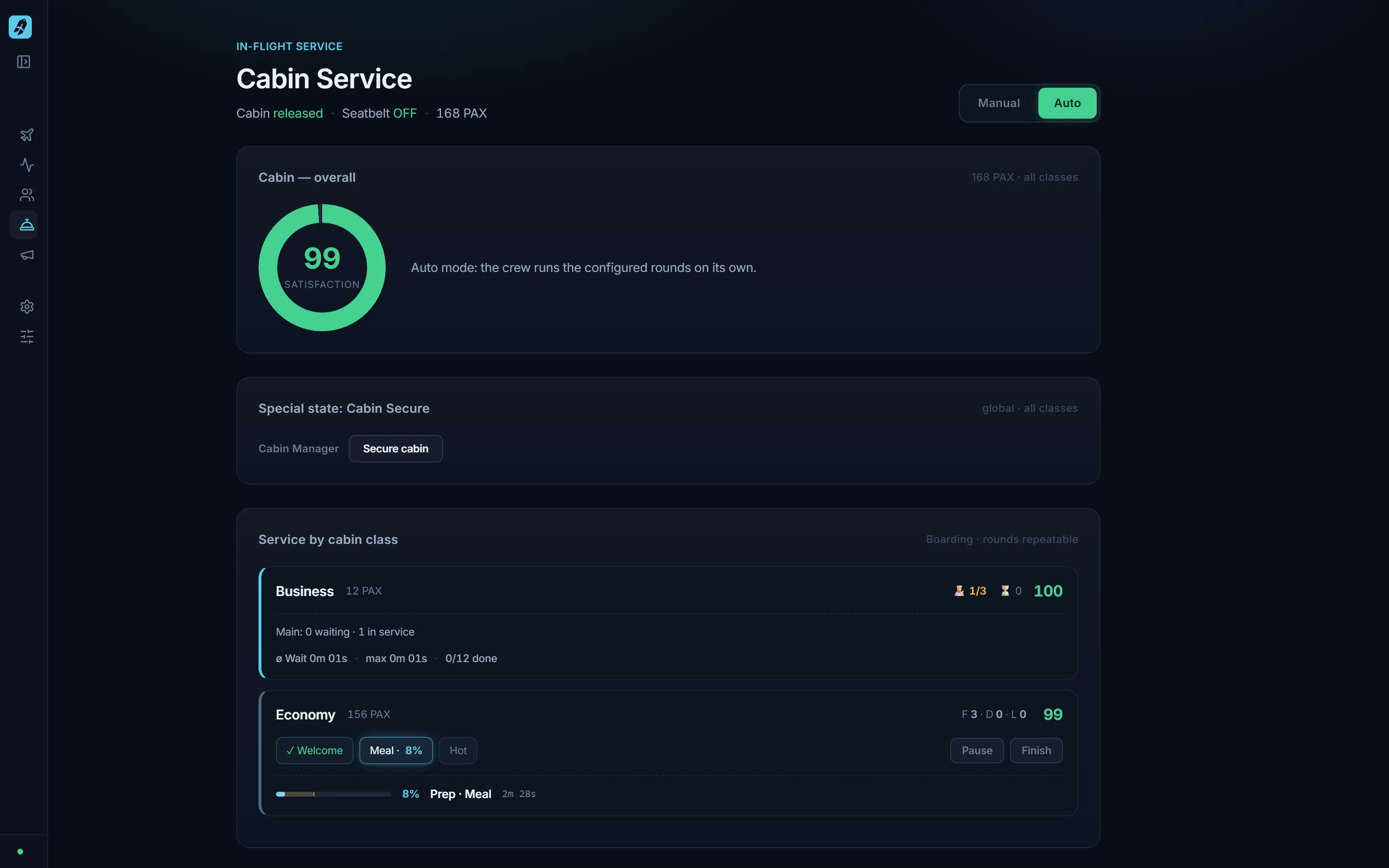
Distribute passengers across classes, then run the service — welcome drinks, meals, hot and cold drinks, duty-free, tidy-up — in auto or manual mode. Food, drink and lavatory demand build up over the flight; the satisfaction score reacts to how well the crew keeps up. First and Business get dine on demand with orders per seat.

  • ✦Seatbelt sign on: the cabin secures itself and rounds pause
  • ✦Live satisfaction 0–100 per class and overall
  • ✦Dine on demand: crew capacity, waiting orders, per-seat courses

More about this →

CabinCRU Cabin Service page: satisfaction ring, cabin secure panel, service rounds per class with progress.
Pro

Announcements at the right moment

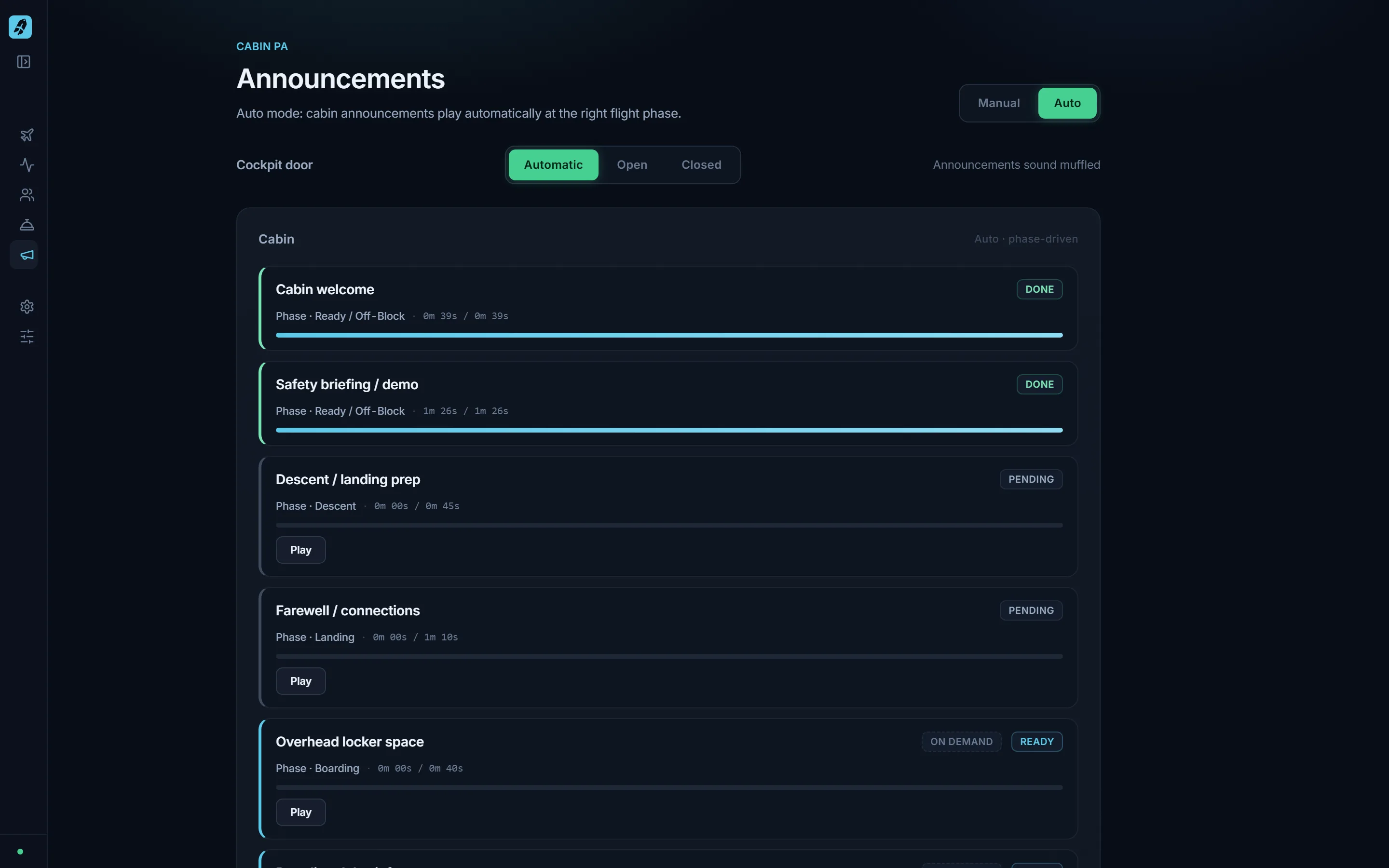
Cabin announcements arm themselves per phase and play automatically or on your command; captain and ground calls stay manual, because Auto never automates the pilot. Spoken in German and English as one sequence, with gong, boarding music and cabin ambience — heard from the cockpit through a door you can open or close.

  • ✦Cabin, cockpit and ground catalogue with situational calls
  • ✦Bilingual sequences, primary and secondary language selectable
  • ✦Cockpit door: automatic, open or closed — announcements sound muffled or open

More about this →

CabinCRU Announcements page: cockpit door switch, cabin announcement cards with phase and progress, cockpit and ground panels.
Free

Start with SimBrief or by hand

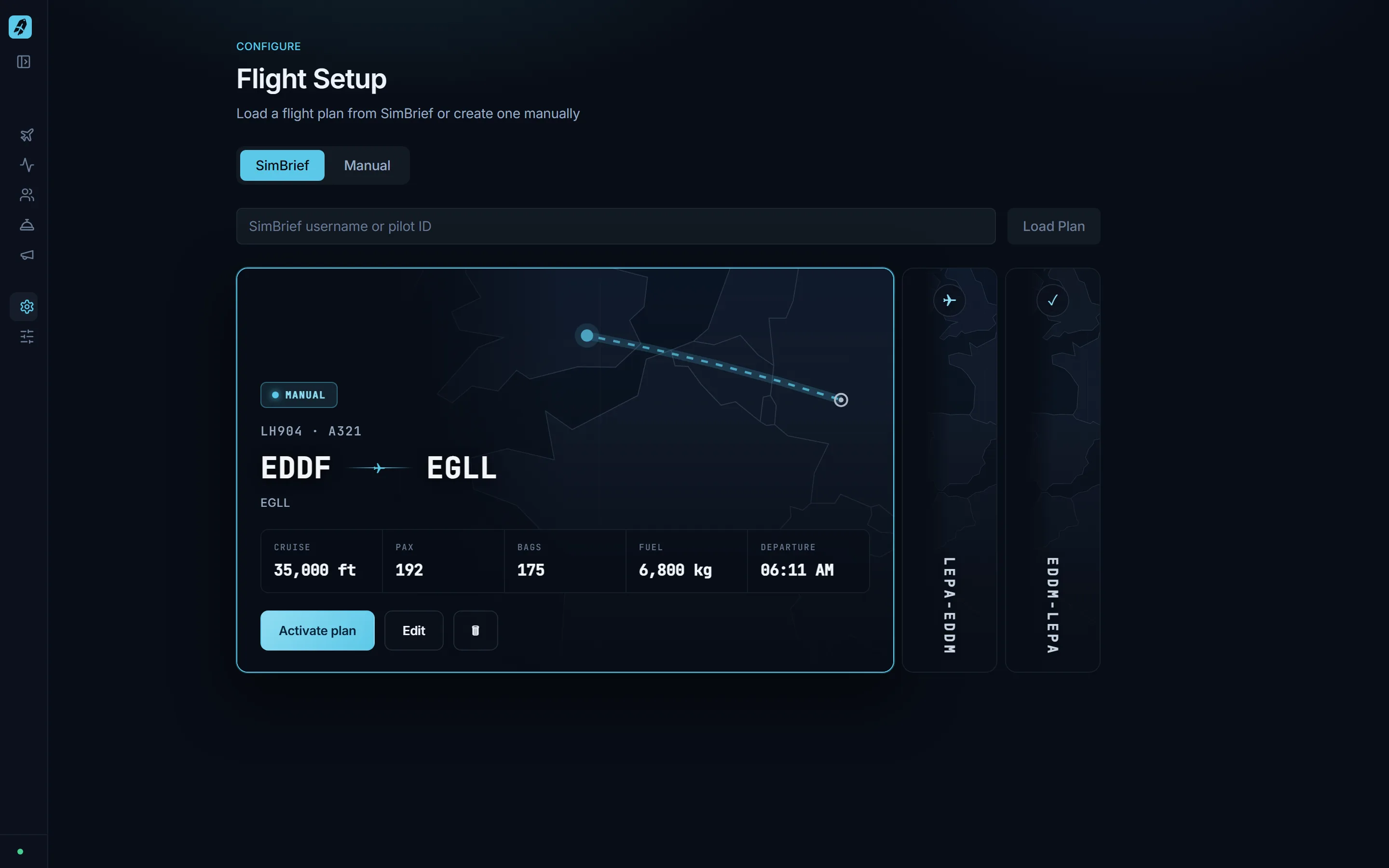
Pull your plan from SimBrief with your username, or create one manually: airports, aircraft, passengers, EOBT — cruise level, bags and fuel optional. Plans appear as cards with a route map. Flown flights stay in the deck, so you can re-fly the route.

  • ✦ICAO airport lookup for local time and top-of-descent
  • ✦Flight history: flown and aborted flights as cards
  • ✦Resume a flight in progress after a restart
CabinCRU Flight Setup page: SimBrief and Manual tabs, flight plan cards with route map, cruise, PAX, bags and departure.

What CabinCRU does not do (yet)

  • –Ground services — fuelling, catering, bridge, de-icing — are not simulated. Use GSX or the sim for that.
  • –No post-flight score or report. History shows what you flew, not how well.
  • –No load control, no weight and balance.
  • –No cloud sync yet — your history lives on your PC.

What you get

Free

The complete flight workflow — free, no account required.

  • ✦Live Flight Deck with MSFS telemetry (SimConnect)
  • ✦Control from any browser in your home network — tablet, phone, second screen
  • ✦Load or create a flight, or import from SimBrief
  • ✦Boarding sequence with delay tracking and door clearance
  • ✦16-phase flight tracking from gate to on-block
  • ✦Flight history: flown flights stay as cards to re-fly

ProPRO

The living cabin: announcements, service, satisfaction.

€17,99Early access

  • ✦Everything in Free
  • ✦Cabin announcements with sound: spoken PA in German and English, gong, boarding music, cabin ambience
  • ✦In-flight cabin service with service rounds per class
  • ✦Live passenger satisfaction
  • ✦Dine on demand in First and Business

One-time purchase. No subscription. Rises to €24,99 once the full release ships — buy during early access and you get it at no extra cost.

Notify me at launch

Coming soon

On the roadmap

Planned, not included yet. We list it so you know where CabinCRU is going — never as part of what you buy today.

  • ◦Load control and weight distribution
  • ◦On-time performance stats and achievements
  • ◦Airline profiles with different SOPs
  • ◦Cloud sync of your flight history