Free
One screen for the whole flight
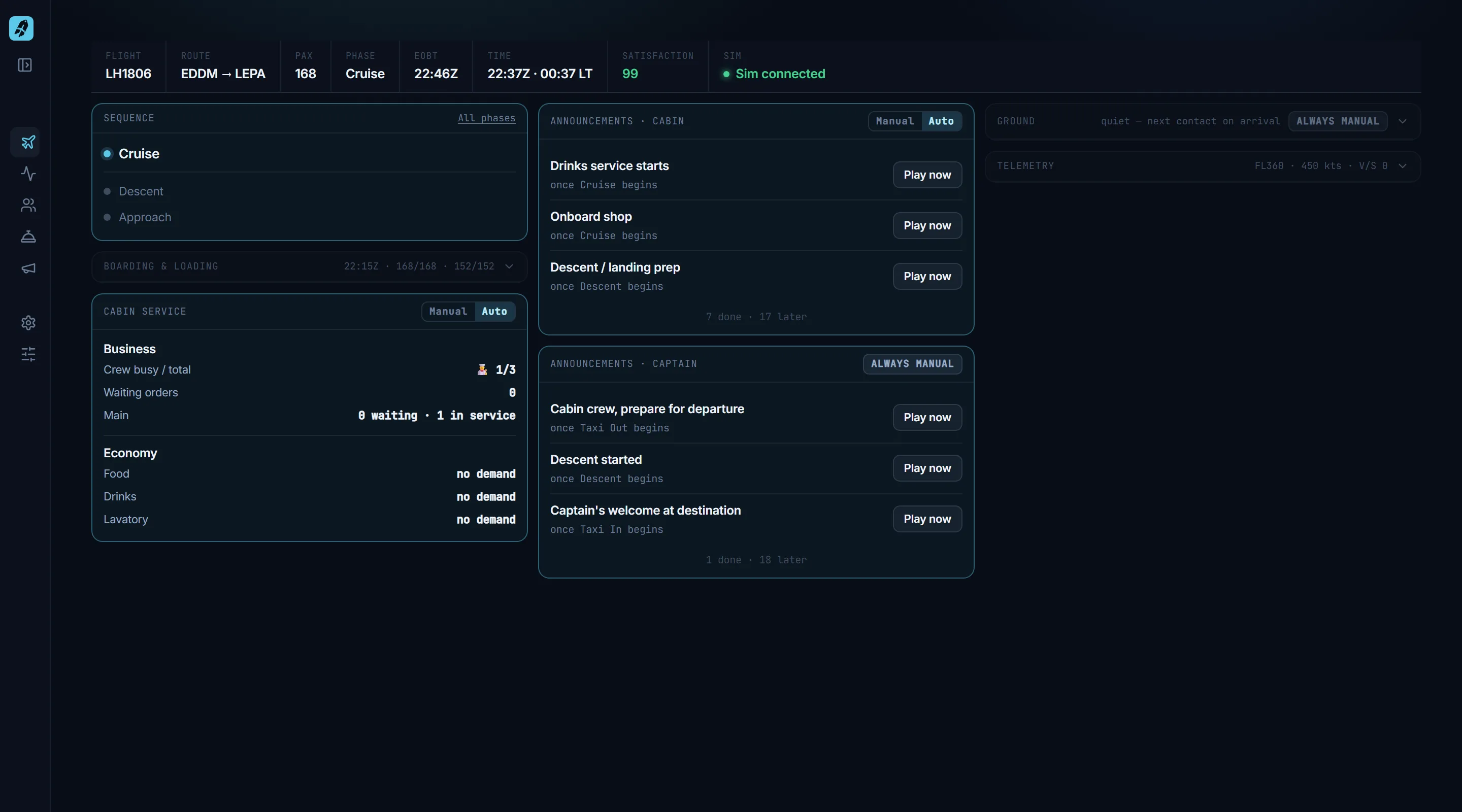
The Flight Deck is CabinCRU's main screen: flight, route, phase, EOBT, time and passenger satisfaction in one status band, with tiles for the phase sequence, boarding, cabin service, announcements, ground calls and telemetry underneath.
How does it work in practice?
The Flight Deck keeps flight, route, phase, EOBT, time and passenger satisfaction in one status band, with tiles for the phase sequence, boarding, cabin service, announcements, ground calls and telemetry. What needs you lights up; what is done or quiet steps back.
The deck is built so that you can read it at a glance mid-flight. What needs a decision from you lights up; what is finished or quiet collapses to a single line. Each tile runs on auto or by hand, so you decide per area whether the crew works on its own or waits for you. Telemetry comes straight from the simulator over SimConnect, which is why the deck follows the aircraft rather than a stopwatch.
- ✦Telemetry straight from MSFS via SimConnect
- ✦Auto or manual per tile — the crew runs it, or you do
- ✦Cabin service and announcement tiles are Pro
Included in the free version.
What does this not do?
The deck reports; it does not fly. CabinCRU never automates the pilot, and it does not simulate ground services such as fuelling, catering or de-icing.